Event Orchestrator

Your tournament,
on one WhatsApp.

Teams check their match schedule, referees receive their assignments, volunteers see where they're needed — and you manage it all from one interface. No app to install.

5
roles served from one system
any language — the AI answers questions in the language they're asked
0
apps to install — everyone just uses WhatsApp
Live
Tournify sync — matches & standings always up to date
API
integration with Tournify, Toernooi.nl, SportLink and more
24/7
operational from setup to closing

Five roles, one scan

Each participant scans a role-specific QR code and is automatically linked to WhatsApp. The system recognises the role and tailors all communication accordingly — no app, no password.

Visitor
Programme, navigation & catering
Team manager
Schedule, standings & updates
Referee
Fixture list & check-in
Volunteer
Shift schedule & tasks
Organiser
Full management & override

Realtime synchronised

Revtek Matchday automatically fetches matches, teams and standings from Tournify. Scores entered via WhatsApp are written back immediately. Field changes automatically generate notifications to all parties involved.

Realtime sync
Automatic match & team import
Matches, pool draws and standings from Tournify — always current without manual work.
Score write-back via WhatsApp
Referee sends final score via chat → Revtek writes back to Tournify → pool standings updated.
Field management & postponements
Field change or delay? Referee and team managers automatically receive a WhatsApp message.
Referee import via CSV
Upload fixture assignments as a CSV file — the system automatically links them to the correct WhatsApp numbers.

Tournify Tournify  Realtime sync
Referee via WhatsApp:
"Final score field 3: FC North 0 – FC Green 3"
Revtek processes & writes back to Tournify:
✓ Pool standings updated  ·  ✓ Teams notified  ·  ✓ Next match scheduled
Field change in Tournify:
Match FC Orange – FC Blue moved to Field 2, 11:00
✓ WhatsApp push to both team managers  ·  ✓ Referee notified
Everything a team wants to know,
direct to their WhatsApp

No long PDF programmes, no printed lists that are outdated the moment a field is swapped. Teams and visitors simply ask what they want to know.

Match schedule on demand

Teams ask for their schedule and get only relevant matches — filtered by team name, field or time slot. Pool draws, opponents and kick-off times always up to date.

Example:
"When does our team play next?"
→ Your next match is at 13:30 on Field 2 vs. Eagles FC. Current standing: 2nd in your pool.
Navigation & facilities

Site map, parking information (car, bike, public transport), canteen location with menu, first aid post, toilets and lost property. Visitors get the info they need without bothering a member of staff.

Example:
"Where is field 4?"
→ Field 4 is behind the changing rooms. 📍 [View site map]
Real-time updates

Field changes, delays, cancellations and other adjustments are immediately pushed via WhatsApp to those concerned — only the team or referee on that field, not everyone at once.

Example broadcast:
⚠️ Match FC Orange – FC Blue moved to field 2. New kick-off time: 11:00.
Standings & engagement

Live standings per pool, score expectations and real-time score notifications after every match. Keeps teams and visitors engaged throughout the day.

Example:
"Who's top of pool B?"
→ 🥇 FC Green 9 pts · 🥈 FC North 6 pts · 🥉 Eagles 3 pts

From check-in to final score —
fully automated

Referees receive their fixture list via WhatsApp, check in with one tap, and send the final score in plain text. The system processes everything — including escalation for no-shows.

Fixture list via WhatsApp
  • Personal fixture list including field, time and opponents
  • Import of assignments via CSV — automatically linked to WhatsApp numbers
  • Push alert on schedule change or field change
Pre-match check-in
  • Automatic WhatsApp message 10 minutes before kick-off: "Are you on site?"
  • Reply with one tap via WhatsApp buttons (Yes / No)
  • Check-in overview per match visible in the admin dashboard
Score & write-back
  • Referee sends score in plain language via WhatsApp
  • Automatically written back to Tournify — pool standings immediately updated
  • Score notification pushed to relevant team managers
No-show escalation
  • No check-in received? Automatic alert to the organiser
  • Call in a reserve referee directly from the WhatsApp chat
  • Disciplinary reports (red card, protest) automatically routed

Shift schedules via drag-and-drop,
reminders via WhatsApp

Plan shifts in a visual calendar and let the system take over the communication. Volunteers know exactly where they need to be — and can check their schedule at any time via WhatsApp.

Visual shift calendar
  • Drag-and-drop shift planning in the admin dashboard
  • Automatic WhatsApp message on assignment with shift time and location
  • Occupancy overview per location and time slot
Automatic reminders
  • WhatsApp reminder 30 minutes before the start of a shift
  • Location and team leader name automatically included
  • Volunteer can check their own shifts via WhatsApp at any time
Replacement management
  • Volunteer reports unavailability via WhatsApp — system finds a replacement
  • Coordinator automatically notified
  • Shift swap can be arranged directly from the admin dashboard
Stock & incidents
  • Volunteers report stock shortages via WhatsApp ("running low on beer")
  • Live stock overview in the admin dashboard
  • Setup and breakdown checklist per role step by step via chat

The organiser sees everything,
in real time

While the event runs, Revtek analyses bot interactions for quality patterns. Unanswered questions, bot errors and incidents become immediately visible in the dashboard — and resolved without redeploying the bot or interrupting the event.

Unanswered questions

Real-time feed of questions the bot couldn't answer, grouped by topic and frequency. See at a glance where your knowledge base has gaps — and which questions are asked most often.

Example dashboard notification:
❓ "Gluten-free options canteen" — asked 14×, no answer
Update knowledge base without downtime

See a question the bot missed? The AI immediately suggests an answer. Approve with one click — the bot answers correctly on the next question, no restart, no downtime, no developer needed.

Suggested answer:
Canteen A offers gluten-free rolls at the dietary counter. → Save ✓
Incident Dashboard

Real-time feed of all reported incidents — first aid, conflicts, lost property — with automatic severity classification (low / medium / critical) and direct routing to the right person or post.

Live dashboard item:
🔴 CRITICAL — Player unconscious Field 3 · First aid alerted · 10:47
Bot errors automatically flagged

The AI continuously monitors bot interactions for quality signals — wrong answers, confusing responses, answer loops. Flagged with severity, context and the exact conversation for immediate action.

Detected pattern:
⚠️ Bot giving wrong field location for Field 6 — 3 conversations affected

Everyone at once, or exactly
the right person

Send messages to all participants, specific roles or individual teams. Schedule announcements in advance or send live updates directly from the dashboard.

Broadcast

Send one message to all registered participants — or filter by role. Reach every referee, every team or all visitors at once. Send count visible per message.

Targeted messaging

Send directly to a specific team, an individual referee or a volunteer at a particular post. Team managers can also be targeted separately without disturbing the rest.

Scheduled messages

Set a send time for announcements — welcome message at opening, mid-day update or closing ceremony reminder. Ready from the moment the day begins, no manual action needed.

Send to:

All participants All referees All volunteers FC Green (team) All visitors Individual recipient Scheduled message

Beyond simple Q&A

Role-aware memory

The system knows who someone is and adjusts answers accordingly — a referee on field 3 gets different information than a spectator or canteen worker.

Group chat summary

Has the coordination channel been buzzing for hours? Ask the bot "What was decided?" and get a concise summary of the relevant action points.

Automatic task creation

When an incident or report comes in, the system recognises the priority and automatically creates a task for the right person — without manual intervention.

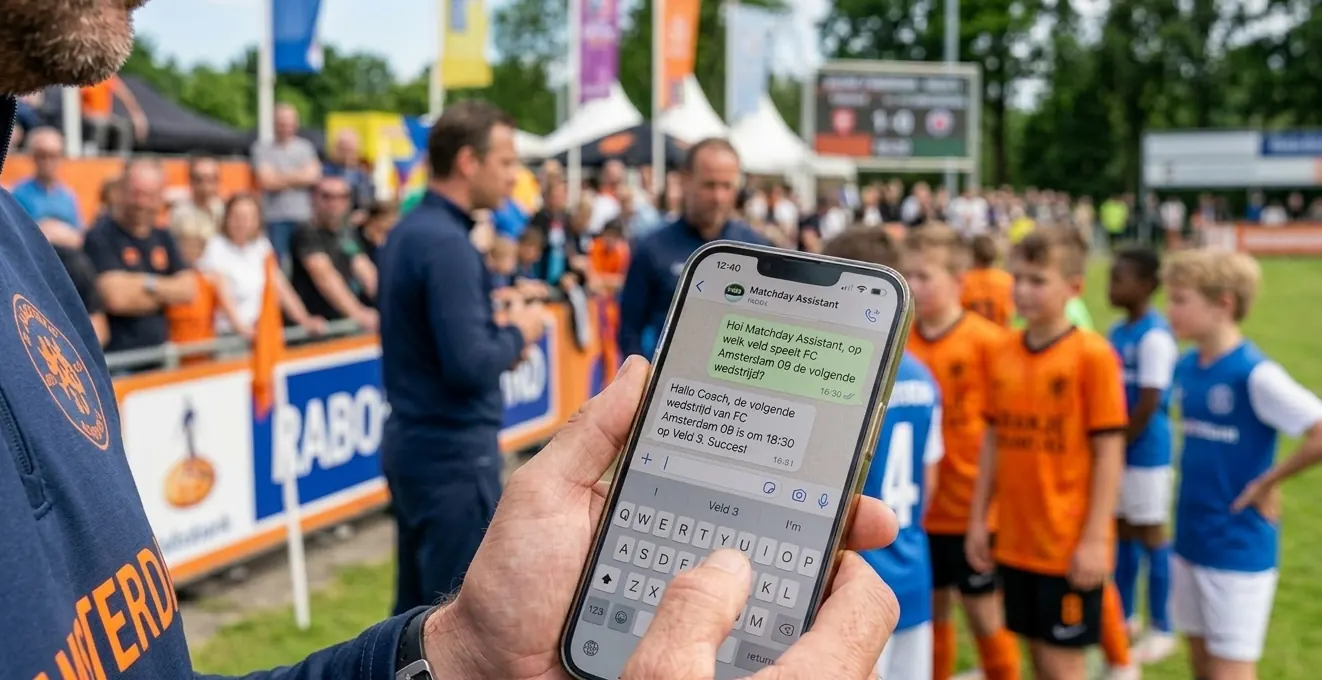
Coach uses WhatsApp for event communication

Works with your tournament platform

Revtek Matchday fetches match data, team draws and standings directly from the system you already use.

Tournify
Tournament software
Toernooi.nl
Amateur tournaments
SportLink
KNVB club system
ClubCollect
ClubCollect.com
Hockey.nl
Hockey federation
API
Any system with an API

Don't see your platform? Get in touch — if it has an API, we'll connect it.

Your data is yours

Revtek Matchday processes only the data necessary for the operation of the event. Nothing more.

GDPR-compliant

Revtek fully complies with the General Data Protection Regulation. Participant data is processed lawfully and transparently.

Data deleted after the event

All event data — participant numbers, messages, roles — is automatically deleted once the event is closed.

Not shared or sold

Your participant data is never shared with or sold to third parties, and is used exclusively for the operation of the event itself.

Role-based access

Each organisation sees only its own events. Participants see only what is relevant to their role. Access is strictly controlled.

Built for the day itself

Tournaments don't fail due to poor communication — they fail because communication arrives too late or reaches the wrong person. Revtek Matchday ensures the right information reaches the right person at the right time.

Built for the day itself — and what comes after

Follow teams, receive scores

Visitors can follow a team and automatically receive the result after every match — including the current standings in the group and when the team plays next.

Live Ops: everything at a glance

During the event, the organiser sees in real time: which pitches are running, which referees have checked in, open incidents and unstaffed positions. All on one screen.

Programme loaded in one step

Upload your referee list, volunteer schedule or programme booklet as an Excel file. The AI reads it and processes everything automatically — no manual entry.

The bot improves itself

Questions the system doesn't answer well are flagged automatically. You see them in the dashboard and can add an answer with one click — active immediately, no restart needed.

More solutions

Ready for a smarter event?

Book a free demo and see how Revtek Matchday works for your tournament or event.

Book a demo

Or email info@revtek.nl